Git hub
GitBash 설치
주소로 이동하여 gitbash를 설치한다.
New Repository 생성
repository란? 깃허브 내에서 나만의 공간을 만드는 작업입니다.
회원가입을 한 후 로그인을 합니다.
GitHub: Where the world builds software
GitHub is where over 50 million developers shape the future of software, together. Contribute to the open source community, manage your Git repositories, review code like a pro, track bugs and feat...
github.com
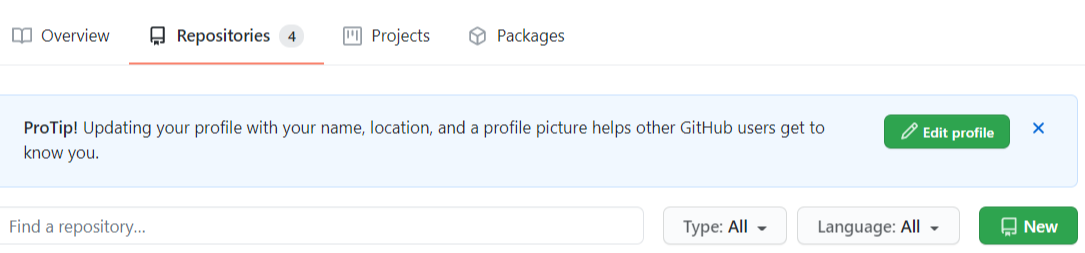
1. New를 클릭합니다.
2. 제목을 입력하고 생성합니다.
Root Folder연결
-기본폴더
-Web 상의 Git과 연결될 Local Folder
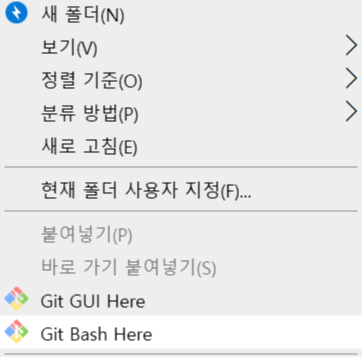
1. 원하는 위치에 폴더를 생성합니다.
2. 오른쪽 버튼을 클릭해 Git Bash Here 버튼을 클릭합니다.
git init
->.hit폴더가 생성됩니다.
git remote add origin repository address
->밑에 보이는 http://github.com/kim-sunah/C-project.get 이 주소입니다.
git remote add origin http://github.com/kim-sunah/C-project.get

Enter후 아무런 말이 뜨지 않아야 정상입니다.
pull / push
pull : git repository에서 자료를 가져오는 행위
git pull origin master
->지정해놓은 repository에서 끌어옵니다.
push : git repository로 자료를 올리는 행위
git status
-> 현재 나의 로컬 폴더와 Git과의 상태를 Check!
git add .
-> 로컬 폴더와 git repository사이에 변경된 파일들이 있을 때 그 모든 파일들을 Tracking 해 달라는 명령어
git commit -m "message"
->인식할 수 있는 commit을 달아줍니다.
git push origin+master
->Git에 실제로 push할 때 사용
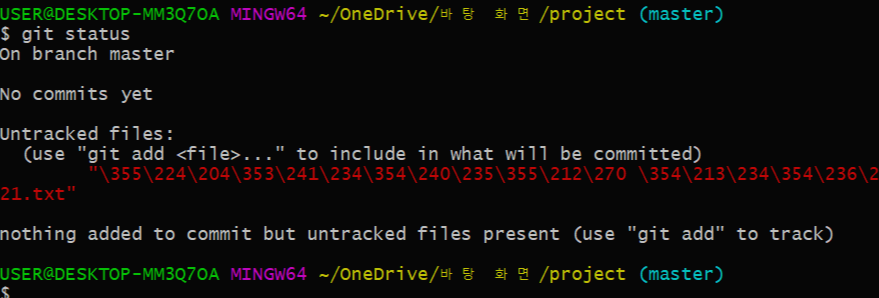
1. 폴더에 .txt 파일을 만듭니다.
2. git status를 사용해 로컬폴더와 git과의 상태를 Check합니다.
(git repository 안에 .txt파일이 존재하지 않는다는 메세지가 표시됩니다..)
3. git add .
->폴더 안에 모든 파일을 Tracking 해줍니다.
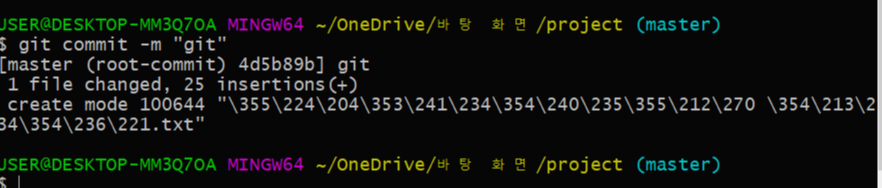
4. git commit -m "git"
깃에 푸시를 할 때 알리기 위한 메시지를 달아줍니다.
(1개의 파일이 바뀌었고 25개(줄 단위)의 추가된 내용이 있다는 메세지가 표시됩니다.)

5. git push origin master
커밋을 성공하면 push 를 통해 자료를 올립니다.
tip)
[Git] remote: Repository not found.
fatal: repository 'URL'' not found
위와 같은 에러를 만난다면,
터미널에 아래 코드로 원격저장소의 URI를 변경해서 해결할 수 있다.
git remote set-url origin https://{githubId}@URL
git remote remove origin
git remote add origin http://{githubId}@URL